
 EN
EN  FR
FR  DE
DE  KO
KO  ES
ES  SV
SV  AR
AR  DA
DA  CS
CS  IT
IT  JA
JA  TR
TR  PT
PT  NL
NL  PL
PL  FI
FI Custom ribbon artwork requirements need a written specification before the buyer can plan custom artwork, dielines, samples, finishes, and production handoff; otherwise suppliers may quote different product and approval assumptions.
This guide maps custom ribbon artwork requirements specifications and evidence to comparable sample requests and RFQ fields.
Direct answer: For custom ribbon artwork requirements, align artwork files, dimensions, material and finish targets, a signed-off sample, packing instructions, and the bulk-production handoff in one controlled specification.
What custom ribbon artwork requirements inputs buyers should prepare before quoting
| Requirement | Factory control | Evidence to verify | Order risk | RFQ follow-up |
|---|---|---|---|---|
| Finish or surface effect | Factory matches approved finish swatch or texture standard | Compare production sample against sealed finish reference under specified lighting | Mismatched sheen or hand feel may cause rejection at final inspection | Request finish chip set with quotation and approve before production |
| Artwork or logo file | Factory converts vector file to print-ready film and checks alignment | Submit digital proof for color and registration approval prior to plate making | Low-resolution or wrong color mode can shift print appearance and delay schedule | Supply CMYK vector artwork and request a hard-copy proof for sign-off |
| Sample approval | Factory holds production until signed sample is returned with dated approval | Inspect sample against artwork proof, finish, width, and color under daylight | Unapproved sample may lead to bulk run with undiscovered defects or spec drift | Sign and date the sample approval form, then authorize production release |
Approving custom ribbon artwork without documented finish, file, and sample criteria exposes the buyer to rework costs and schedule overruns. Each requirement must be locked before the factory commits to tooling or material purchase. The buyer should treat these inputs as contractual specifications that define what the supplier must deliver and what the buyer will accept.
After preparing the artwork inputs, the buyer must confirm all commercial numbers—including pricing, minimums, and lead time—directly in the written quote request. Sample approval is the final gate before production; any deviation from the approved sample voids the factory's obligation to match the original spec. Request a dated approval form and retain a sealed reference for the shipment inspection.
Questions to confirm before ordering:
- What is the exact artwork file format and color mode required? File format and color mode directly affect print sharpness and color match; wrong settings cause rework or rejection. Supplier accepts vector PDF with CMYK color mode and embedded fonts; no raster-only or RGB submissions. Submitting low-resolution or RGB files leads to blurry print, color shift, and costly re-approval cycles. Request the supplier's artwork specification sheet and confirm file format, resolution, and color space before sending files.
- Does the artwork include bleed, safe zone, and repeat length markings? Ribbon printing requires precise repeat alignment; missing bleed or safe zone causes design cutoff or misregistration. Supplier provides a template with bleed, safe zone, and repeat length; artwork matches those guides exactly. Artwork without proper bleed and repeat markings results in wasted material and production delays. Download the supplier's artwork template and verify your design fits within the safe zone and bleed area.
- What is the maximum number of colors or print passes supported? Color count and print passes determine cost, lead time, and achievable design complexity; over-specifying inflates quotes. Supplier clearly states max colors per pass and offers multi-pass options with cost and time impact. Exceeding color limits forces additional passes, raising cost and extending production without prior notice. List your design's color count and ask the supplier for standard and multi-pass pricing before finalizing artwork.
- Is a physical proof or digital mock-up required before production? Proof approval gates prevent color and alignment errors; skipping it shifts risk of mismatch to the buyer. Supplier includes one round of digital or physical proof in the quote and specifies approval turnaround time. Without a proof, final ribbon may have color, scale, or placement errors that are only visible after bulk run. Confirm proof type (digital or physical), number of revision rounds, and approval deadline in the quote request.
Compare the supplier record with the ISO 2859-1 sampling inspection standard before accepting the requirement.
How custom ribbon artwork requirements choices change MOQ, cost, and timing
- Compare submitted artwork file against the approved color standard and finish spec. A mismatch in color or finish can shift the final ribbon appearance, requiring a new sample run and delaying the order. Buyer’s designated approver or procurement lead. Verify that the digital proof matches the physical sample under controlled lighting. Document any discrepancy and request a corrected proof before signing off.
- Confirm that the artwork file format and resolution meet the printer’s minimum requirements. Low-resolution or wrong-format files cause print defects, rework, and added cost for file conversion or re-plating. Supplier’s prepress technician and buyer’s art coordinator. Check file dimensions, DPI, color mode, and bleed against the supplier’s artwork guide. Request a preflight report from the supplier and approve only after all errors are resolved.
- Review the approved sample for correct ribbon width, weave, and edge finish. A width or weave deviation can make the ribbon unusable for its intended packaging or application, forcing a reorder. Buyer’s quality control lead or product manager. Measure width with a calibrated ruler and inspect edge finish under magnification. If the sample does not match, reject it and request a revised sample with corrected specs.
- Check that the order quantity and MOQ align with the approved artwork version and production schedule. Ordering below the confirmed MOQ for a specific artwork version can trigger a price increase or production delay. Buyer’s procurement manager. Compare the PO quantity against the supplier’s minimum order table for that material, width, and print method. If the quantity is below minimum order, negotiate a higher volume or select a different artwork version from the wholesale ribbon families.
- Confirm the production lead time after sample approval and before bulk order release. Assuming a standard lead time without confirmation can cause missed delivery windows and expedite fees. Buyer’s logistics or supply chain coordinator. Request a written lead-time commitment from the supplier based on current factory load. If the lead time does not meet the deadline, escalate to expedite or split the order.
quote request checkpoint
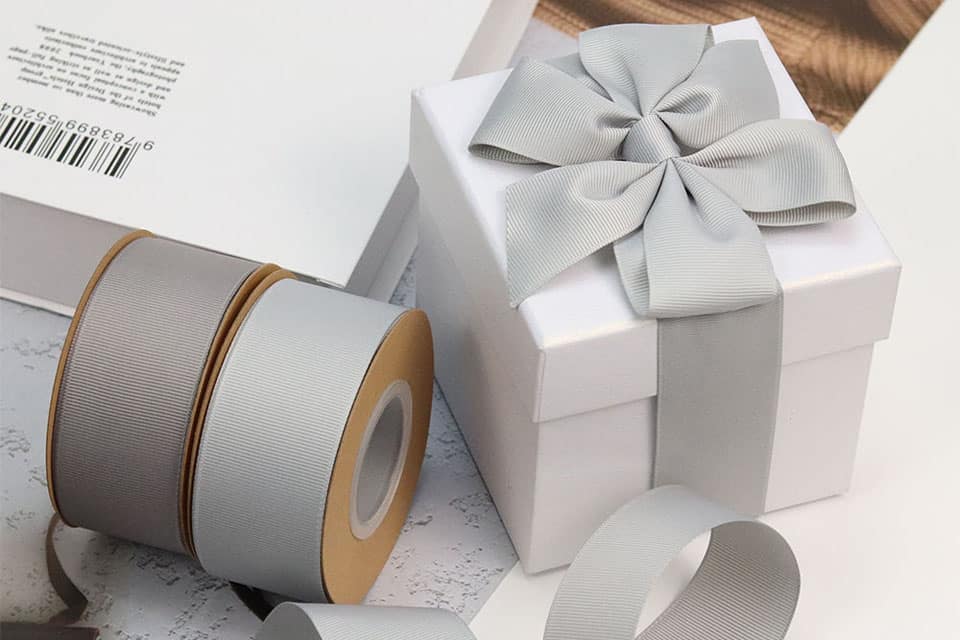
Which custom ribbon artwork requirements quote assumptions buyers should normalize
If your artwork file does not match the factory’s print-ready format, assume the quote will include a setup fee or a higher unit cost. Normalize this by confirming the required file type (e.g., AI, EPS, PDF with embedded fonts) and color mode (CMYK) before requesting a quote.
Use this practical checklist to align assumptions across specs, cost, production risk, and handoff:
- Specs: Confirm artwork dimensions match ribbon width and repeat length; verify bleed and safe zone requirements.
- Production risk: Request a proof of color match (e.g., Pantone reference) and a strike-off sample before full production.
- Factory execution: Confirm the factory’s tolerance for color variation (e.g., buyer-approved color tolerance) and registration alignment.
- quote request/sample handoff: Provide a signed approval form with the proof; specify the number of production samples needed for sign-off.
For more on file preparation, see our satin ribbons.
How to set the custom ribbon artwork requirements approval route
- Document full specification details for the custom ribbon artwork. Artwork file, color codes, material, width, and print method. Proof or print-ready file confirming all specs match the order. Missing or mismatched specs cause rework and delay; verify against the quote. Approve the proof or request corrections before production.
- Confirm lead time based on artwork approval date. Approved artwork and any special processing requirements. Confirmed production schedule and delivery window. Unapproved artwork delays the entire timeline; set a firm approval deadline. Align the production start date with your inventory needs.
- Check quality control for print accuracy and material consistency. Approved sample or reference standard for color and finish. Inspection report or pre-shipment sample for buyer review. Color variation or print defects are costly to fix post-production; require a physical sample. Sign off on the sample or request adjustments before bulk run.
- Perform buyer follow-up to verify all order parameters are locked. Final PO with confirmed specs, quantity, and delivery date. Order acknowledgment and production milestone plan. Last-minute changes increase cost and lead time; freeze specs after approval. Schedule a mid-production check if the order is large or complex.
- Use a verification method to confirm the artwork meets print-ready standards. Artwork file in required format (e.g., AI, PDF, EPS) with bleed and color profile. Preflight report or compatibility confirmation from the factory. Unsupported file formats cause conversion errors and delays; check before submission. Resubmit corrected file or request factory guidance for the MEEDEE ribbon factory.
What buyers should confirm before releasing a custom ribbon artwork requirements RFQ
| Option | Best fit | Trade-off | Risk to avoid | Verification | Follow-up |
|---|---|---|---|---|---|
| Current specification as designed | Buyer has final artwork and material specs locked before RFQ release | No flexibility for factory-side print limitations or material availability | Artwork may be rejected if it exceeds the factory's print resolution or color gamut | Request factory's print-ready file format guide and color profile requirements | Send current spec to factory for a pre-RFQ compatibility check |
| Alternative specification with adjusted print method | Design requires fine text or gradients that standard ribbon printing cannot hold | May increase unit cost or require a different ribbon substrate (e.g., satin vs. grosgrain) | Switching print method mid-RFQ can delay sample approval and inflate MOQ | Confirm the factory's minimum line width and registration tolerance for each print method | Request a print method comparison sheet with cost and MOQ impact per option |
| Custom option with modified artwork dimensions | Artwork must fit a non-standard ribbon width or repeat length | Requires new die or cylinder, increasing tooling cost and lead time | Non-standard dimensions may limit future reorder flexibility and supplier options | Ask factory for a tooling amortization schedule and minimum repeat quantity | Document the custom dimension as a separate line item in the RFQ |
| Safer fallback using a simplified artwork design | Buyer needs faster approval and lower risk of print defects | Reduces visual complexity and may not match brand guidelines exactly | Simplified design may be rejected by internal stakeholders for lacking detail | Compare a proof of the simplified design against the original artwork side-by-side | Create an internal approval gate for the fallback design before RFQ submission |
Preserve the current specification as designed decision under one revision number: keep the supplier response, marked sample, approved specification, quotation, and approval owner together. If the evidence conflicts with the approved record, hold the quote, sample, or production release until the deviation is explained in writing. Once the buyer and designated technical authority have accepted the evidence, carry the signed approval record into the purchase order, production handoff, shipment release, and later reorder review so every team works from the same baseline.
Unanswered commercial and production questions
Before releasing the quote request, confirm whether the factory can produce your artwork at the specified width, repeat length, and color count without additional tooling. Unanswered questions about print registration tolerance, ink type compatibility, and substrate availability often cause sample rejections and cost overruns. Document each commercial and production assumption as a written checkpoint.
In conclusion
The final approval of your custom ribbon artwork requirements rests on verifying that your file format, color specifications, and material constraints match the factory’s print-ready capabilities before you commit to a quote. By comparing each supplier’s artwork format, Pantone matching method, and production lead time against your own specification, you reduce the risk of costly reprints or delays. Document the approved artwork version under a single revision number, then request a digital proof to confirm layout and color placement. Once validated, you can confidently shortlist a supplier and move to sample approval, ensuring your procurement decision is grounded in verified technical alignment rather than assumptions.
To request a quote for custom ribbon artwork, use custom ribbon manufacturing to confirm the final specification, quote assumptions, sample approval, QC evidence, approval risk, and supplier follow-up before bulk order.
Custom ribbon artwork requirements FAQ
Which quote terms should buyers compare before RFQ?
Compare each factory’s artwork format requirement, color matching method (Pantone or CMYK), and whether they include a digital proof in the quoted price. Confirm the minimum order by material, width, color count, and printing method, and ask for the standard production lead time after sample approval — standard bulk production is 2–4 weeks after sample approval, while complex custom programs (custom printed, specially dyed or otherwise complex) can take up to 60 days and are confirmed in the quotation. Request a written quotation that itemizes any setup or plate charges, and verify that the supplier can meet your order schedule before you release the quote request.
Which choices alter the applicable MOQ, quotation, proofing route, and production schedule?
The material (satin, grosgrain, or recycled polyester), ribbon width, number of ink colors, and artwork version all affect the minimum order, proofing route, and production timeline. For example, a single-color design on a standard width may qualify for a lower minimum order and faster proofing, while multi-color or full-bleed prints often require a higher minimum order and a physical strike-off sample. Check with the factory how each variable changes the quotation and schedule, and document the agreed terms before sample approval.
Which sample or QC proof should buyers request?
Request a digital proof first to confirm layout, text, and color placement. For critical color matching or complex artwork, ask for a physical strike-off sample on the actual ribbon material. Verify that the sample matches your approved Pantone reference and that print registration is sharp. If the factory offers a pre-production sample from the actual production run, use that to check color consistency and repeat length before you approve full production.
What should buyers verify before approving custom ribbon artwork requirements?
Verify that your artwork file meets the factory’s print-ready format (vector PDF, AI, or EPS with fonts outlined) and that all colors are specified as Pantone or CMYK. Confirm the minimum order, unit cost, and lead time in writing, and ensure the supplier has the capacity to deliver on your schedule. Before approving, review the digital proof or physical sample for color accuracy, print alignment, and ribbon width tolerance. Document the approved artwork version and any revision history to avoid production errors.
quote request handoff: Send Specs for Review.
Editorial note
Prepared by the MEEDEE Ribbon Editorial Team and reviewed against current product, customization and sourcing information supplied by Meedee Ribbon Inc. Commercial terms such as MOQ, sampling and lead time should be confirmed for each specification.